
Notices
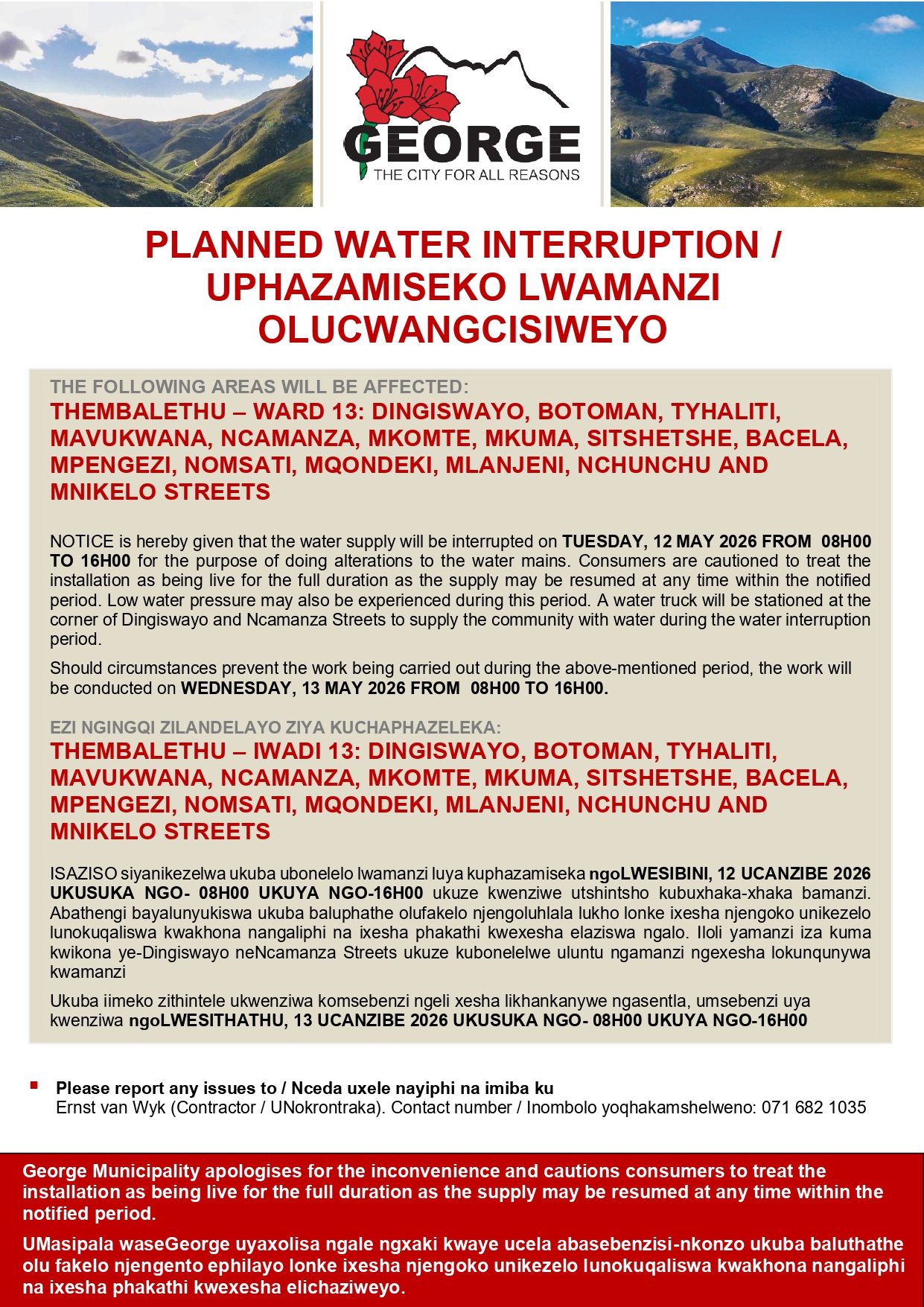
Updated – Public Notice: Temporary closure of facilities due to heavy weather conditions
Please note that due to unforeseen circumstances, heavy weather conditions, and related safety concerns, the following facilities of George Municipality are affected today:
• Vehicle Testing Stations is closed due to operational difficulties
• Blanco MVR Facility is closed.
• Hibernia Street MVR Facility is currently affected by a power outage. (We will give an update once it has been resolved)
• Wilderness Tourism Office is closed to the public.
The safety of our Officials and the public remain a priority. Services will resume as soon as it is safe and operationally feasible to do so.
Update 8: Storm Warning, 6 May
Measured Rainfall as at 8.30am, 6 May
Uniondale 136mm
Waboomskraal 117mm
Wilderness 73mm
Witfontein 76mm
Service Delivery Challenges
The public is advised that due to the inclement weather NO refuse collection will take place today.
Municipal Offices / Facilities Closed to Public
Wilderness Tourism
MVR Blanco and Hibernia Street
Power Outages Confirmed
Uniondale – power restored
Haarlem and Avontuur currently without power. (ESKOM)
Thembalethu, Zone 9 (George Municipal)
Flooding/Waterlogged – proceed with caution
George CBD – Courtenay Street, Knysna Road, Merriman Road, Wellington Street, Albert Street
Uniondale – Voortrekker Street, Hospital Street, Gray Street, Cathcart Street, Rose Street, Berkley Street, St George’s Street, Lang Street
Confirmed Road Closures
Please take note that Meiringspoort, between Beaufort West and Oudtshoorn, remains closed due to flooding and dangerous conditions.
Please take note that the Swartberg Pass, between Prince Albert and Oudtshoorn, remains closed due to dangerous conditions following severe weather.
Report Provincial Road Issues via Download the Roads4U app
Google Play: https://play.google.com/store/apps/details?id=za.gov.westerncape.roadsforyou
iOS: https://apps.apple.com/za/app/roads4u/id6752285666
Residents are encouraged to monitor the Municipality’s social media platforms, website, and local media for regular updates.
Emergency Contact Numbers:
George:
• Switchboard (07:45–16:30): 044 801 9111
• After-hours and emergencies: 044 801 6300
• Disaster Management (Toll-Free): 087 152 9999
• Fire Department: 044 801 6311
• Garden Route Disaster Centre: 044 805 5071
• Civil Engineering Customer Services: 044 801 9262 / 044 801 9266 (07:45–16:30) for stormwater-related complaints
• Law Enforcement: 044 801 6350 / 044 801 6389
Uniondale:
• Fire: 044 752 1225
• Switchboard and fault reporting: 044 752 1024
Public Notice: Temporary closure of facilities due to heavy weather conditions and circumstances out of our control
Please note that due to unforeseen circumstances, heavy weather conditions, and related safety concerns, the following facilities of George Municipality are affected today:
• Blanco MVR Facility is closed.
• Hibernia Street MVR Facility is currently affected by a power outage. (We will give an update once it has been resolved)
• Wilderness Tourism Office is closed to the public.
The safety of our Officials and the public remain a priority. Services will resume as soon as it is safe and operationally feasible to do so.
UPDATE 2_HIGH ALERT AS HEAVY RAIN AND SEVERE THUNDERSTORMS FORECAST
Severe Weather Warning Remains in Effect – George Municipality on High Alert
George Municipality confirms that contingency plans remain fully activated, with all relevant services on high alert as severe weather conditions are expected from Wednesday, 6 May to Thursday, 7 May 2026.
The South African Weather Service (SAWS) has maintained its warning of an intense cut-off low-pressure system impacting parts of the Western Cape. The alert levels remain unchanged, including a Yellow Level 2 warning, as well as Orange Level 6 and Orange Level 8 warnings for significant disruptive rainfall across central and eastern regions. SAWS has advised that the cut-off low-pressure system is expected to result in widespread and disruptive rainfall (100–200 mm in places), flooding of roads, settlements and low-lying areas, damaging winds, coastal waves (5–7 m), disruptive snowfall in high-lying areas, and severe thunderstorms with hail and excessive lightning.
Municipalities in the Garden Route, Overberg, and Central Karoo are particularly at risk. Affected areas include: George, Uniondale, Haarlem, Knysna, Bitou, Mossel Bay, and Oudtshoorn.
An integrated, multi-sectoral response remains in place across all municipal directorates, including Disaster Management, Community Services, Planning and Human Settlements, Traffic Services, Civil Engineering, and Technical Services, as well as operations in Uniondale.
Additional operational updates:
• SANParks is responsible for the opening of the Touw River mouth and is on high alert to implement this measure should conditions require it.
• Municipal services continue as normal; however Refuse collection for Wednesday 6 May will focus on black bags only, subject to rainfall levels. A further notice will be issued tomorrow morning in this regard.
Residents are advised to exercise extreme caution and, where possible, avoid travelling during this period. Where necessary, loudhailing has been conducted in vulnerable areas, and residents have received SMS alerts.
Where possible, residents are encouraged to move to higher ground and seek shelter with family or friends.
The Western Cape Department of Education has pre-emptively closed schools for Wednesday and Thursday in the following circuits:
• Circuit 3 and 8 (George)
• Circuit 4 (Knysna)
• Circuits 5 and 6 (Oudtshoorn)
Safety Reminders:
• Clear gutters and drains to prevent flooding
• Do not dump waste illegally, as it blocks stormwater systems
• Report blocked or damaged stormwater infrastructure
• Ensure yard drainage systems are functioning
• Remain indoors where possible
• Avoid flooded roads, low-lying areas, and rivers
• Be ready to move to higher ground if required
• Ensure pets are safe
• Sand for sandbags can be collected at George Fire Department, Mitchell Street entrance/
Residents are encouraged to monitor official municipal platforms and local media for updates
Emergency Contact Numbers
George:
Switchboard (07:45–16:30): 044 801 9111
After-hours and emergencies: 044 801 6300
Disaster Management (Toll-Free): 087 152 9999
Fire Department: 044 801 6311
Garden Route Disaster Centre: 044 805 5071
Civil Engineering (Stormwater): 044 801 9262 / 044 801 9266
Law Enforcement: 044 801 6350 / 044 801 6389
Uniondale:
Fire: 044 752 1225
Switchboard / Faults: 044 752 1024
After-hours: 044 801 6300
Rescheduling of Learner’s Licence Test – UNIONDALE ONLY
Please be advised that the Learner’s Licence Test scheduled for Wednesday, 6 May in Uniondale has been postponed due to inclement weather.
Arrangements are being made to reschedule the test at the earliest available opportunity. All affected applicants will be notified of the new date in due course.
The Municipality apologises for any inconvenience caused and thanks applicants for their understanding and cooperation.
Schools in certain areas of the Eden and Central Karoo Education District will be closed on Wednesday, 6 May and Thursday, 7 May 2026
Issued on behalf of Minister David Maynier, Western Cape Minister of Education on 5 May 2026
In the interests of learner and teacher safety, and after extensive consultation with the Provincial Disaster Management Centre and the South African Weather Service (SAWS), a decision has been taken to close schools in certain areas of the Eden and Central Karoo Education District on Wednesday, 6 May 2026, and Thursday, 7 May 2026.
All public ordinary and special needs schools in the following specific circuits will be closed on Wednesday, 6 May 2026, and Thursday, 7 May 2026, due to the severe rainfall warnings in these areas:
* Circuits 3 and 8 (George)
* Circuit 4 (Knysna)
* Circuits 5 and 6 (Oudtshoorn)
Our default position is always to keep schools open and only close schools in exceptional circumstances, but we are mindful of the severity of the warnings in place.
We will continuously monitor and evaluate the situation to ensure that schools can reopen as soon as possible.
All schools are expected to open on Friday, 8 May 2026. We will, however, evaluate the weather prediction for the end of the week to determine whether any individual school closures are necessary for the remainder of the week.
List of school closures on 6 and 7 May 2026. Note: Circuits 3,4,5,6 and 8 of Eden and Central Karoo District only. (Schools to reopen on 8 May 2026)
Eden and Central Karoo Circuit 3
- Conville Primary School
- Diepkloof VGK Primêre Skool
- Eden Technical High School
- George Voorbereidingskool
- Hibernia VGK Primêre Skool
- Hoekwil Laerskool
- Jonga Street Secondary School
- Karatara Laerskool
- Klipdrift EK Primêre Skool
- Lancewood Primêre Skool
- M M Mateza Primary School
- Olympia Skool
- Outeniqua Primary School
- Parkdene Primêre Skool (George)
- Parkdene Sekondêr
- Redlands Primêre Skool
- Ruigtevlei Primêre Skool
- Sedgefield Laerskool
- Sedgefield Primêre Skool
- Tabatha Primary School
- Thembalethu Secondary School
- Thembalethu Primary School
- Touwsranten VGK Primêre Skool
- Tyholora Primary School
- Van Kervel Spesiale Skool
- Waboomskraal VGK Primêre Skool
- York High School
Eden and Central Karoo Circuit 4
- Bracken Hill EK Primêre Skool
- Chris Nissen Primary School
- Concordia High School
- Concordia Primêre Skool
- Formosa Primêre Skool
- Fraaisig Primary School
- Harkerville EK Primêre Skool
- Hornlee Primêre Skool
- Knysna Hoërskool
- Knysna Primary School
- Knysna Satellite Office
- Knysna Sekondêr
- Kranshoek Primêre Skool
- Kwanokuthula High School
- Kwanokuthula Primary School
- Murray High School
- Percy Mdala High School
- Phakamisani Primary School
- Plettenberg Bay Primary School
- Plettenbergbaai Sekondêr
- Rheenendal Primêre Skool
- Sunridge Primêre Skool
- The Crags Primêre Skool
- Thembelitsha Primary School
- Wittedrift Primêre Skool
- Wittedrift Hoërskool
Eden and Central Karoo Circuit 4
- Aurial College
- Bergsig Primêre Skool
- Bridgton Sekondêr
- Calitzdorp Hoërskool
- Colridge Primêre Skool
- De Jager VGK Primêre Skool
- De Villiers Primêre Skool
- Eljada-Kairos Skool
- Excelsior VGK Primêre Skool
- Fezekile Secondary School
- Gamka-Oos Primêre Skool
- Grootkraal UCC Primêre Skool
- Kruisrivier-Wes UCC Primêre Skool
- Langenhoven Gimnasium
- Lategansvlei SSKV Primêre Skool
- Laurus Primere Skool
- Oudtshoorn Hoërskool
- Oudtshoorn School of Skills
- Rodewal UCC Primêre Skool
- Rooiberg SSKV Primêre Skool
- Volmoed Primêre Skool
- Voorbedag Primêre Skool
- Wesbank Laerskool
- Zeekoegat VGK Primêre Skool
Eden and Central Karoo Circuit 6
- Avontuur LB Primêre Skool
- Bongolethu Primary School
- Britsevlakte NGK Primêre Skool
- De Rust Primêre Skool
- De Rust Sekondêr
- Dirk Boshoff Primêre Skool
- Dysselsdorp Primêre Skool
- Dysselsdorp Sekondêr
- Haarlem Sekondêre Skool
- Mooi Uitsig Primêre Skool No.2
- Morester Sekondêr
- P.J. Badenhorst Primêre Skool
- Protea Hoërskool
- Rooiheuwel VGK Primêre Skool
- Rooirivier VGK Primêre Skool
- Sacred Heart RK Primêre Skool
- Saturnus Primêre Skool
- Scheeperskraal SSKV Primêre Skool
- St. Konrad RK Primêre Skool
- Uniondale Hoërskool
- Van Reede Laerskool
- Vlakteplaas UCC Primêre Skool
Eden and Central Karoo Circuit 7
- Blanco Laerskool
- Carpe Diem Skool
- Dellville Park Primary School
- Denneoord Laerskool
- Dieprivier VGK Primêre Skool
- Franken VGK Primêre Skool
- Geelhoutboom VGK Primêre Skool
- George Sekondêr
- George-Suid Laerskool
- Heatherlands High School
- Heidedal Primêre Skool
- Herold Laerskool
- Holy Cross Primary School (George)
- Hoogekraal SSKV Primêre Skool
- Imizamo Yethu Secondary School
- Kommandantsdrift SSKV Primêre Skool
- Kretzenshoop Primêre Skool
- Mzoxolo Primary School
- New Dawn Park Primêre Skool
- Outeniqua Hoërskool
- Pacaltsdorp Primêre Skool
- Pacaltsdorp Sekondêr
- Rosemoor Primêre Skool
- St. Mary’s RK Primêre Skool (George)
- St. Paul’s EK Primêre Skool (George)
- Van Der Hoven Laerskool
Heavy Rainfall Warning and Emergency Contact Details

Residents are reminded that heavy rainfall is expected this week. This may lead to localised flooding, slippery roads, poor visibility, and possible service disruptions.
Please take note of the following tips:
* Clear gutters and drains to prevent flooding
* Refrain from illegal dumping, as it can block stormwater drains, and avoid littering
* Report blocked or damaged stormwater infrastructure to the Municipality
* Ensure yard drainage systems are clear and functioning properly
Emergency Contact Numbers:
* Fire Department: 044 801 6311
* After-hours: 044 801 6300
* Disaster Management (Toll-Free): 087 152 9999
* Garden Route Disaster Centre: 044 805 5071
* Gun Plast assistance: 044 802 2026
* Civil Engineering Customer Services: 044 801 9262/6 (7:45am–4:30pm) for stormwater-related complaints
* Civil Engineering Customer Services (Uniondale/Haarlem after hours): 044 801 6300
Further updates will be communicated via the George Municipality’s official channels.
PLASTIC SHEETS (GUNPLAST) IN BAD WEATHER
‘Gunplast’ (plastic sheeting) is provided only during inclement weather when the municipality has plastic sheeting available. Due to funding constraints, preference is given to the elderly and disabled persons residing in informal settlements (excluding persons who illegally invaded municipal land) who are living in informal housing where roofs are dilapidated. Thereafter, if more plastic is available, applicants may be assisted following an investigation into the circumstances of applicants and the condition of the structure. Backyarders residing on private property are not assisted as per the approved emergency housing policy.
The municipality emphasises that the provision of ‘Gunplast’ is a temporary relief measure during bad weather and it remains the responsibility of the applicant to seek means to repair the roof and/or structure. ‘Gunplast’ delivered in the most deserving cases. Only one piece of ‘Gunplast’ (6m x 6m) per applicant will be issued every 6 months.
Qualification criteria for assistance with Gunplast (Micron Plastic) or any similar suitable material:
Who will be assisted
• Persons residing in informal settlements in structures which, during an assessment, has been found to have serious leakages, and who are unable to assist themselves.
Who will not be assisted
• Single persons under the age of 60 with no dependants ;
• Persons residing on private property;
• Persons residing in formal houses;
• Households who have received assistance within past six months unless an assessment deems it necessary; and
• Persons who have illegally invaded land.
Requests for ‘Gunplast’ can be made in one of the following ways:
• Visit your nearest Area Office Monday to Friday, or Ward /other Councillor who will report on your behalf by completing the relevant application forms. The applicants are welcome to visit the offices of the Human Settlements Department situated on the corner of St John’s and Varing Streets. Copies of the applicant(s) ID’s are compulsory and copies of their dependant’s birth certificates/ID’s (younger than 18).
• Applicants can also email the completed application form to hemeyer@george.gov.za
• The request can be logged via the Municipal App – My Smart City via Housing Queries OR General Request with the necessary Contact Details, Names of Residents affected and Street Address.
• A ‘Gunplast’ application MUST include the applicant’s name, surname, identity number and the address (name of the informal settlement and structure number) where the ‘Gunplast’ is required.
• When a request is received, an investigation is made at the address provided and ‘Gunplast’ delivered in the most deserving cases. Only one piece of ‘Gunplast’ (6m x 6m) per applicant will be issued.
• Please note any requests sent directly to officials via Whatsapp or direct email will not be addressed.
Documentation required when applying for “gunplast”:
• ID Copies of applicants,
• Copies of minor children(s) birth certificate(s)
Enquiries:
Emergency Housing (Temporary Structures) & assistance with gunplast (micro plastic)
Harriet Meyer 044-802 2026 hemeyer@george.gov.za
AFTER HOURS
After hours telephonically report the matter to the George Joint Operations Centre (JOC) on 044 801 6316 or After Hours number 044 801 6300 or via Toll-Free Disaster Number 087 152 9999.
You will not be supplied with GUNPLAST without having completed the necessary application forms and submission through the correct channel.